CEPH is a networked storage system that provides a POSIX-like filesystem accessible from all TU Cookbooks notebook servers within BinderHub/JupyterHub sessions. Authentication is handled automatically by your JupyterHub session — no credentials are needed.
Within any BinderHub or JupyterHub session, it is mounted at the home directory (/home/jovyan/) as cookbooks-input-data, i.e. /home/jovyan/cookbooks-input-data.
This is not accessible by default from the Jupyter GUI. In order to access or upload data here, you will need to go via a terminal within a BinderHub/JupyterHub server (see Adding Data).
Permissions depend on your TU account affiliation:
TU employees (staff@tuwien.ac.at): Read and write access
Other TU accounts: Read-only access
To check if you have staff access, visit https://staff@tuwien.ac.at in your eduPersonScopedAffiliation attribute.
When to use the CEPH Filesystem
Use the shared CEPH filesystem when:
Your data should be accessible to TU members but not the public
You’re working exclusively within the BinderHub environment
Consider other options if:
You need public accessibility (consider Git LFS)
Adding Data to the Shared Filesystem
Downloading Files with wget
For files already available on the internet, you can use wget directly from a notebook cell:
# Download a file directly to the shared filesystem
!wget -P /home/jovyan/cookbooks-input-data/alchemy-cookbook/ https://secretatransmutationis.aeiou/plumbus_aurum.csv
Or from a terminal:
wget -P /home/jovyan/cookbooks-input-data/alchemy-cookbook/ https://secretatransmutationis.aeiou/plumbus_aurum.csvThis method works for files of any size (within reason) and is the recommended approach for adding data to the FS if the data exists on a public server already.
Uploading via the Notebook Interface
The /home/jovyan/cookbooks-input-data directory is located next to the default startup directory, not inside it, so it is not directly accessible via the Jupyter file browser GUI. You must first upload files to your notebook directory, then use the terminal to move them:
In the file browser sidebar, click the “Upload” button:
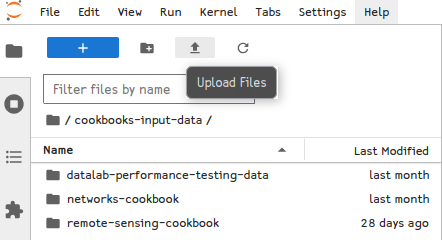
Select files from your local machine
Once uploaded, open a terminal in JupyterLab and move the file from the working directory to the FS mount:
mv path/to/uploaded/file.csv /home/jovyan/cookbooks-input-data/alchemy-cookbook/
Accessing Data
For programmatic access, the filesystem works like any local mount.
from pathlib import Path
fs_path = Path("/home/jovyan/cookbooks-input-data")
print("Contents of shared filesystem:")
contents = list(fs_path.iterdir())
for item in contents[:10]:  # Show first 10 items
    print(f"  - {item.name}")
if len(contents) > 10:
    print(f"  ... and {len(contents) - 10} more items")
Contents of shared filesystem:
- remote-sensing-cookbook
- datalab-performance-testing-data
- networks-cookbook
- data-access-cookbook
- .ipynb_checkpointsExample: Reading File Data
Once you know what files are available, you can read them directly, as you normally would, using pandas or other libraries. For example, the alchemy cookbook keeps a register of failed transmutation attempts:
import pandas as pd

data_file = fs_path / "alchemy-cookbook/plumbum_aurum.csv"
data = pd.read_csv(data_file, parse_dates=["dies_experimenti"], date_format="%Y-%m-%d")
print(f"Data shape: {data.shape}")
print(data.head())
Data shape: (18, 6)
dies_experimenti ingressus exitus_optatus methodus observatio successus
0 1387-03-12 plumbum aurum calcinatio fumus niger expulit me ex laboratorio False
1 1387-04-05 plumbum aurum sublimatio vas confregit; canis magistri aufugit False
2 1387-05-21 plumbum aurum distillatio nihil novi sub luna False
3 1387-07-19 plumbum aurum coniunctio color rufus per momentum visus est False
4 1387-09-02 plumbum aurum putrefactio odor in toto monasterio per septem dies FalseNext Steps
If the data used by your cookbook should be accessible by the broader public (outside TU Wien), see the Git LFS notebook.