Quick Start
Before you start writing your cookbook have a quick read over these cookbook and notebook considerations.
After reading the considerations you should:
Install uv tool, depending in your operating system. [´uv´]
Install the
copiertoolRender a local repository from a template (see here)
Create a remote repository (see here)
Create a Git repository from the local template (see here)
Upload (push) the local repository to TU Wien GitLab (see here)
Use the Appropriate Template
Choose a template depending on the programming language of your Choice.
Currently available are:
Once that is done follow the instructions in the Template’s Documentation for the technical setup of a cookbook. Use a name for the template that ends with “Cookbook”, like “Networks Cookbook”.
Turn it into a Cookbook
We use myst as the book building framework. The most
important file is the myst.yml. Here you can add your notebooks which will become the chapters
of your cookbook.
Table of contents:
project:
  toc:
    - file: root.md
    - file: first-child.ipynb
    - file: second-child.md
But also configuration, front matter and metadata are included in this file.
title: My First Article
date: 2022-05-11
authors:
  - name: Mason Moniker
    affiliations:
      - University of Europe
The easiest way is to use Jupyter notebooks as chapters. But it is possible to use exclusively markdown text files by adding code cells to markdown files, like so:
```{code-cell} python
hello = "hello"
there = "there"
phrase = f"{hello}, {there}!"
print(phrase)
```
Myst has rich features for scientific reporting, such as, citing academic work, e.g.,
[](doi:10.5281/zenodo.6476040). Have a look at the extensive
mystmd guide for more inspiration.
GitLab Repository Setup
Open the Browser and go to the
TU GitLabCreate a new repository in the
privateGroup. Ask the admins to be added as a maintainer to this group if you do not have access yet.Make sure the
GitLabrepo does NOT contain any files (no automatic readme generation)Set up CI/CD to enable the automatic build of the pages
Go to Settings in the repository you created
Under Visibility, project features, permissions, enable the Repository (CI/CD) toggle
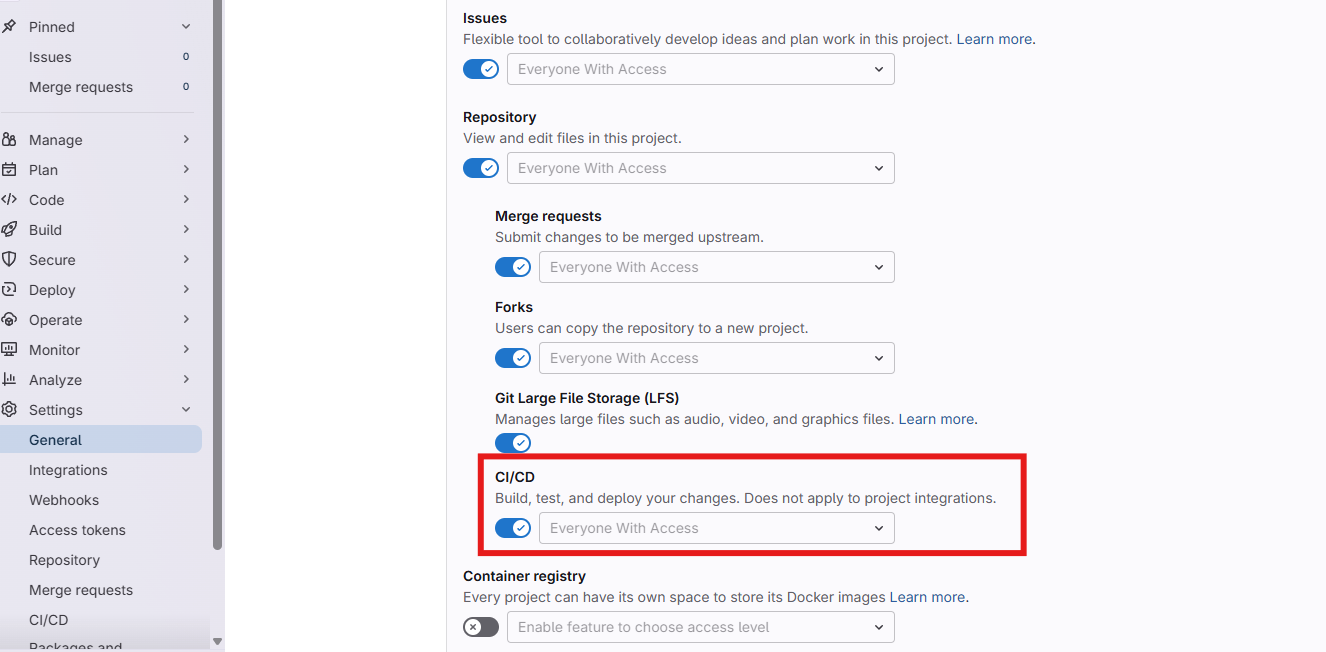
CI/CD toggle setting
Local Repository Setup
Initialize a Git repository
git initConfigure git user email to match your
TU GitLabaccount (command can be copied from the empty GitLab repo you created)git config --local user.email <YOUR-EMAIL>Commit all files
git add .
git commit -m "initial commit"
Push your Changes
Add the GitLab repo as a remote to the local repo (can be copied from the GitLab repo as well)
git remote add origin <URL>Push the repo to GitLab (should be included when copying the previous command from GitLab)
git pushNow the TU Cookbook will automatically build as static GitLab pages and as as a BinderHub image.
🚀🚀 Check out your new TU Cookbook 🚀🚀